Overview
Outertech develops Windows software designed to improve the speed, stability and handling of your computer. Our lead products include Cacheman - a tuneup utility to make your computer run faster by optimizing memory and cache usage, Linkman - an internet utility to manage your bookmarks, StartEd - the Windows startup editor and GetDiz, a fully featured freeware text editor which can replace Notepad while maintaining an incredible speed, ease of use and small size.


Update announcement list
Click subscribe and enter your email address to get informed about new versions of Outertech software. Click remove to be deleted from the newsletter.

Privacy Policy

Select another product
Download
1.0 WinNT/Win2k/WinXP
Have you ever faced a situation where you have waited for a program to complete and had the feeling the program may have crashed? Wouldn't it be nice if you could always see if your CPU is really working? Well, you could have the task manager window in front, but how about a program that doesn't waste valuable screen space? CPUUsage System Service is a free tool that displays the cpu load as a tray icon image. It's very easy to use and utilizes minimal resources.

CPUUsage is freeware. To keep the development up please consider donating.
CpuUsage installs itself as a system service and loads automatically when Windows starts. If you want to use it only when required, you can disable the loading in the tray icon menu.

The following 3 screenshots show CPUUsage in action.

1. CPU is idle


2. CPU usage at 60%


3. CPU usage at 100%


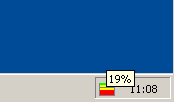
Hover the mouse pointer over the tray icon to see the exact CPU usage percentage as a hint.


Menu overview


Refresh rate

Set how often the tray icon should be updated.

Pause on permanent high CPU Usage after

When the CPU performs intensive calculations for a long time (typical examples are encoding a video stream or playing a game), you can set the time after which CPUUsage should suspend itself. The tray icon will not be updated while in suspend mode. Set this parameter to never if you want the tray icon to be constantly updated.

The tray icon is reactivated in a few seconds after the CPU ends the intensive calculation (Click the icon to update it immediately).

Load on Windows startup

If checked CPUUsage will load on Windows startup, uncheck if you don't want to use it permanently.free software,software,freeware,Cpu,Cpu usage,Cpu load,Tray Icon,Task Manager,Cpu Info,Cpu time

....


German English France Home Contact About us Support Buy Now Downloads Products Home TrialPay